One click to export unlimited leads and their contact information into a spreadsheet. Enrich professional email with Email Finder API. bypass the LinkedIn Sales Navigator export limit.
Get started - it's free






A smart tool to extract B2B leads with Email from LinkedIn Sales Navigator. One click to Export leads from LinkedIn Sales Navigator to CSV / Excel.
Quickly export large people search results from Sales Navigator.
Grab company profiles in bulk without manual copy & paste.
Plug into popular enrichment services to get verified work emails.
Automatically include available emails, phones, and social links.
Capture key company web properties for downstream enrichment.
Keep useful reach metrics for prioritization and scoring.
Normalize messy fields for cleaner spreadsheets and CRMs.
Flexible formats to import into your workflow and tools.
Get started in a few simple steps.
Add to Chrome or Edge and pin the icon for quick access.
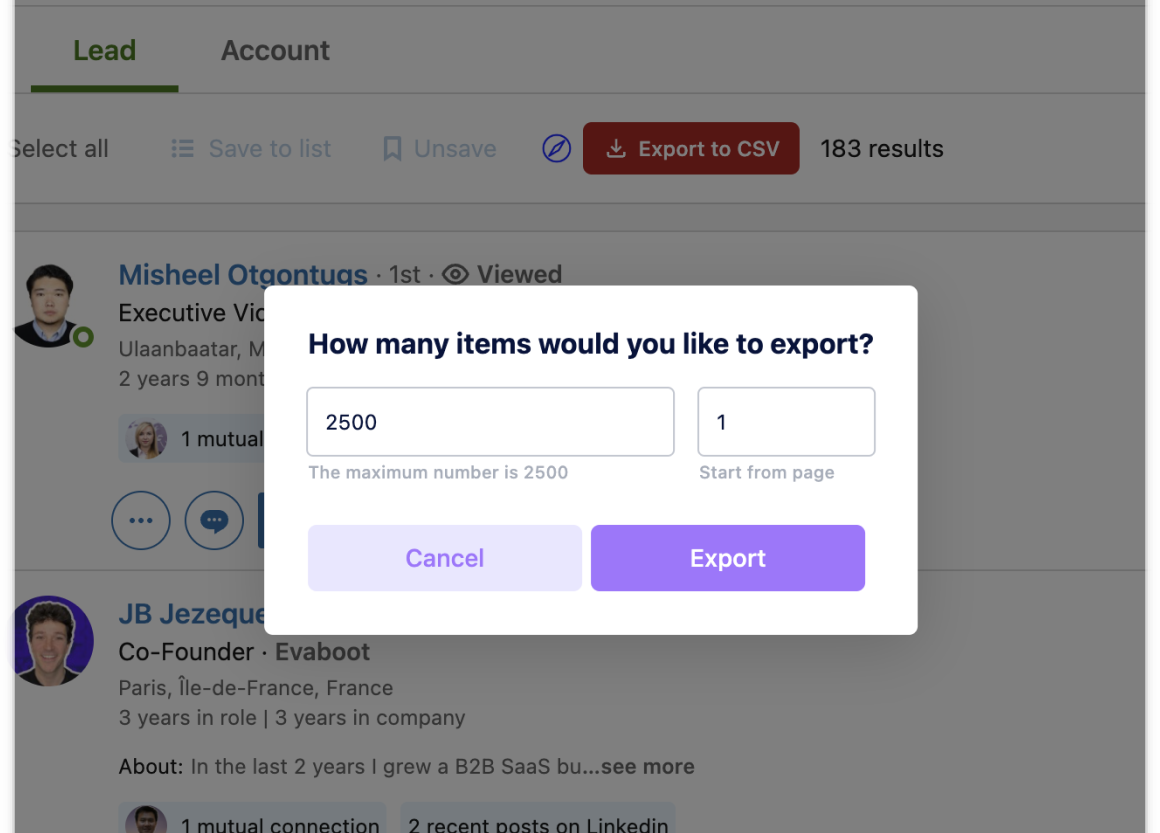
Open Sales Navigator, search lead (people)/account (companies), click the "export to CSV" button.
Get CSV/Excel/JSON and import into your CRM and tools.
How teams use LinkedIn Sales Nav Lead Exporter in their daily workflow.
Find ICP leads and export with verified emails for outreach.
Build target account lists with key firmographics for ABM.
Pull attendees/speakers and follow up with personalized emails.
Map roles and companies in a niche and segment by attributes.
Fields included in exported datasets.
| Field | Description | Example |
|---|---|---|
| profile_id | Internal unique profile identifier. | 1234567890 |
| salesnav_url | Sales Navigator profile URL. | https://www.linkedin.com/sales/people/… |
| linkedin_url | Public LinkedIn profile URL. | https://www.linkedin.com/in/johndoe/ |
| first_name | First name. | John |
| last_name | Last name. | Doe |
| full_name | Full name. | John Doe |
| degree | Connection degree (e.g., 1st/2nd/3rd). | 1st |
| is_premium | Whether the user has LinkedIn Premium. | true |
| is_openlink | Whether the user allows OpenLink messages. | false |
| location | Primary location. | San Francisco, CA, United States |
| about | About/bio section text. | Seasoned sales manager… |
| job_title | Current title/role. | Sales Manager |
| job_description | Role description if available. | Leading a team… |
| company | Current company name. | Acme Inc. |
| industry | Profile industry. | Software |
| company_salesnav_url | Sales Navigator company URL. | https://www.linkedin.com/sales/company/… |
| company_linkedin_url | Public LinkedIn company URL. | https://www.linkedin.com/company/acme/ |
| company_location | Company HQ or listed location. | San Francisco, CA |
| company_logo | Company logo URL. | https://…/logo.png |
| viewed | Whether the profile is marked viewed in SN. | false |
| saved | Whether the profile is saved in a list. | true |
| pending_invitation | Whether an invite is pending. | false |
| picture_url | Profile picture URL. | https://…/profile.jpg |
| Primary email if available. | john@acme.com | |
| phone_primary | Primary phone number if available. | +1 555-123-4567 |
| phone_numbers | All found phone numbers. | ["+1 555-…", "+44 20…"] |
| website | Primary website if available. | https://johndoe.com |
| websites | All listed websites. | ["https://…", "https://…"] |
| twitter_primary | Primary Twitter handle if available. | @johndoe |
| twitter_usernames | All Twitter usernames found. | ["johndoe"] |
| wechat_name | WeChat display name if available. | johnwechat |
| wechat_qr | WeChat QR image (base64) if available. | data:image/png;base64,… |
| wechat_qr_url | WeChat QR image URL if available. | https://…/qr.png |
| ims | Instant messaging identifiers. | ["skype:johndoe", "telegram:johndoe"] |
| interests | Interests/topics if available. | ["SaaS", "Sales"] |
| birth_date | Birth date if available. | 1990-01-01 |
| connected_date | Date connected (for 1st-degree). | 2023-08-10 |
| followers_count | Number of followers. | 1200 |
| connections_count | Number of connections. | 500 |
| following | Whether you follow this profile. | true |
| followable | Whether profile is followable. | true |
| Field | Description | Example |
|---|---|---|
| salesnav_url | Sales Navigator company URL. | https://www.linkedin.com/sales/company/… |
| linkedin_url | Public LinkedIn company URL. | https://www.linkedin.com/company/acme/ |
| company_name | Company name. | Acme Inc. |
| description | Company description. | Acme is a B2B SaaS platform… |
| industry | Primary industry. | Software |
| employee_range | Employee size band. | 51-200 |
| employee_count | Approximate employee count. | 120 |
| company_logo | Logo URL. | https://…/logo.png |
| saved | Whether saved in a list. | true |
| website | Company website. | https://acme.com |
| domain | Company web domain. | acme.com |
| company_type | Company type (Public/Private/etc). | Private |
| founded_date | Year founded. | 2014 |
| universal_name | LinkedIn universal name/slug. | acme |
| headquarters | Headquarters location. | San Francisco, CA |
| following | Follower count. | 12345 |
Where you can get answers to common questions about LinkedIn Sales Nav Lead Exporter
You don’t have to take our word for it
I was manually copy-pasting lead data for hours every week. This tool automated the entire process, letting me export clean, ready-to-use lists in minutes. It's saved me at least 10 hours a week.
Michael
Sales Assistant
Building targeted lead lists for our campaigns is critical. This tool not only exports the data I need but also cleans it up, which has improved our email deliverability and campaign ROI. An essential tool for any marketing team.
Jessie
Growth Marketer
This tool is a game-changer. I can export thousands of leads with enriched emails in minutes, which used to take hours. It's a must-have for any sales team looking to crush their quotas.
David
Sales Development Rep
We use this for building our ABM campaign lists. The data is clean, and pulling company info like domain and employee count is incredibly useful for segmentation. It saves my team countless hours.
 Sarah
Marketing Operations
Sarah
Marketing Operations
As a founder, I need lean and effective tools. This extension is exactly that. It's simple, powerful, and lets us bypass Sales Nav's export limits, which has been huge for building our pipeline.
 Alex
Founder
Alex
Founder
Finding top talent is a numbers game. This tool helps me quickly build candidate pipelines from Sales Navigator and export them for outreach. The ability to pull contact info is a huge plus.
 Chris
Recruiter
Chris
Recruiter
For market analysis, I need large, clean datasets. This tool's ability to export thousands of company profiles with details like employee count and industry is invaluable. It's made my research far more efficient.
 Linda
Market Researcher
Linda
Market Researcher
Stop wasting time on manual data entry. Start exporting thousands of qualified leads from Sales Navigator in just one click.
All Pro plans come with a 7-day money-back guarantee. No questions asked.